Configuring Advanced Settings
The properties on the Advanced page allow you to view the device configuration in XML format, save the settings to an XML file, load previously saved settings from an XML file, and configure thread settings and retention settings.
|
Advanced page |
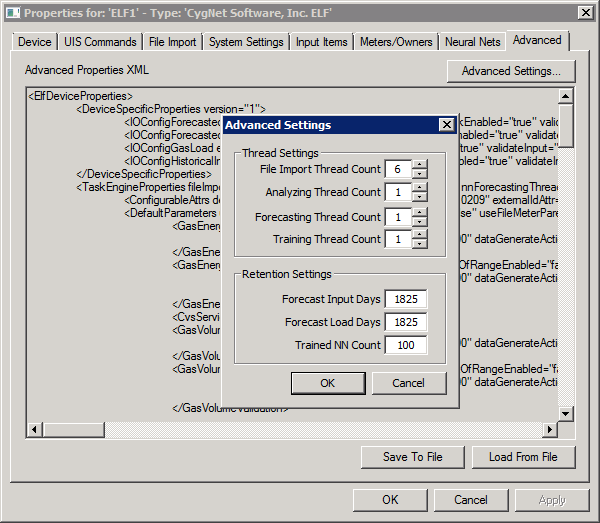
The properties on this page are described below.
Once a device is configured, the device settings may be exported to an XML file. Then if you wanted to create another device with the same settings, you would just need to load the first XML file. This feature is also helpful to backup a device configuration in case settings are accidentally changed or lost.
| Parameter | Description |
|---|---|
|
Advanced Properties XML |
The settings for this device are displayed in XML format. |
|
Advanced Settings |
Click Advanced Settings to configure thread count and retention count and days. See Advanced Settings below. |
|
Click Save to File to save the device configuration to an XML definition file. Navigate to the desired file location, type the file name, and click Save. or Click Load from File to import the device configuration from a previously saved XML definition file. Navigate to the desired file, select it, and click Open. |
Advanced Settings
Configure thread count for the file import, variance analysis, forecasting and training processes; and retention count and days for forecast input, forecast load and trained neural networks.
Thread Settings
| Parameter | Description |
|---|---|
|
File Import Thread Count |
Specifies the maximum number of threads allowed for file import. |
|
Analyzing Thread Count |
Specifies the maximum number of threads allowed for variance analysis. |
|
Forecasting Thread Count |
Specifies the maximum number of threads allowed for energy load forecasting. |
|
Training Thread Count |
Specifies the maximum number of threads allowed for neural network training. |
Retention Settings
By default the PNT/VHS will purge data after 1825 days. If you change this setting, only new points created after the setting change will be affected. Old data will still have the 1825 setting.
| Parameter | Description |
|---|---|
|
Forecast Input Days |
Specifies the maximum number of days into the past that forecast input data records must be retained in the VHS before they are purged. |
|
Forecast Load Days |
Specifies the maximum number of days into the past that the energy load forecasts must be retained in the VHS. |
|
Trained NN Count |
Specifies the maximum number of trained neural networks for a given forecast meter or meter group that are retained in the GRP service. Only trained neural networks that exceed both the configured retention count and retention days will be purged. |


